Hands-On Activity:
Intro to Programming
Overview
There are two activities to try for this topic: the first is a simple temperature-converting program, and the second is a number-guessing game.
Both activities are done using Python.
You may complete these activities in an IDE, text editor, paper and pencil, or whatever medium you choose.
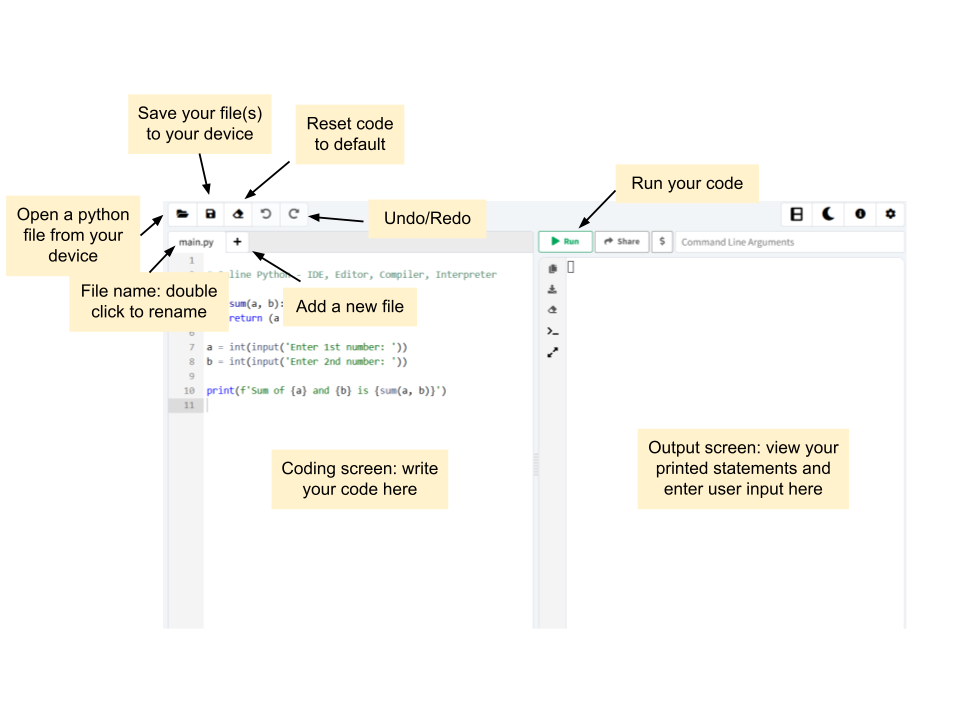
If you choose to use an IDE, we suggest using online-python.com, as it is simple and easy to use.
The elements you will likely be using on online-python.com are highlighted here:
Activity 1: Temperature Converter
Objective
Create a program that converts a value from Celsius to Fahrenheit
Concepts
Variables, data types, operators
Steps
- Create an integer variable celsius that holds the value 40
- Create an integer variable fahrenheit that converts the value in celsius (( _ * 1.8 )+32 )
- Print out celsius and fahrenheit to the user
Syntax To Use
- … = … – create a variable with a value
- print(…) – print value in parenthesis
Expected Results
celsius = 40

fahrenheit = (celsius * 1.8) + 32

print(celsius)

print(fahrenheit)
Activity 2: Number Guessing Game
Objective
Create a program where users guess a randomly generated number
Concepts
Variables, libraries, loops, operators, data types, conditionals
Steps
- Import the “random” library into your program
- Create a variable that holds a random number from 1 to 100
- Create a variable that tracks the number of tries a user can make and set it to 10 tries
- Create a loop that continues until the user runs out of tries
- Decrease the number of tries a user has by 1
- Take in the user’s input and store it in a variable
- Compare the input to the random number
- If the guess is equal to the secret number, print out a statement to the user letting them know they got the answer, and break out of the loop
- Otherwise, if the guess is less than the number, print out a statement to the user letting them know it’s too low
- Otherwise, if the guess is higher than the number, print out a statement to the user letting them know it’s too high
Syntax to Use
- import … – import a library to use in your program (make sure this is at the top of your program)
- random.randint(low int, high int) – use the random library to generate a random number in the given range
- … = … – create a variable
- while …: – loop that runs when the condition is true
- … -= … – decrease a variable by a value
- int(input(“…”)) – prints out a statement to the user and converts their input to an integer
- if …/elif …/else: -block that runs if the condition is true
- print(…) – print value in parenthesis
- break – exit a loop
Expected Results
import random
number = random.randint(1, 100)

tries = 10

while tries > 0:
    tries -= 1
    guess = int(input("Enter a number: "))

    if guess == number:
        print("Correct answer!")
        break
    elif guess < number:
        print("Your guess is too low!")
    else:
        print("Your guess is too high!")