AI: First Steps into AI

Introduction
This manual is a reference for artificial intelligence (AI): the key concepts, tools, and techniques a beginner needs to understand and use AI well. You can read it start to finish, or jump to any section when you need it.
Each concept, tool, and technique in this manual is explained the same way: what it is, how it works or how to use it, why it’s worth learning, what it’s similar to, and an example.
What Working with AI Feels Like
Using an AI assistant feels like working with a very fast, very well-read helper who has never met you, is always confident, and is sometimes wrong. It can draft, explain, summarize, and brainstorm in seconds, but it only knows what you tell it and what it learned in training.
Experienced AI users pay attention to a few things every time:
- Context: the more relevant detail they give, the better the answer
- Iteration: the first answer is a draft, so they follow up and refine
- Verification: they check facts, sources, numbers, and code before relying on them
- Privacy: they think about what data they’re pasting and where it goes
No coding or math background is needed for this manual. If you can use a web browser, you can follow everything here.
Software Interface: Microsoft 365 Copilot Chat
Most of the hands-on work with AI uses Microsoft 365 Copilot Chat, an AI chat assistant that UW-Madison provides free to all students, faculty, and staff. Other chat assistants like ChatGPT, Claude, and Gemini are laid out almost the same way, so what you learn here carries over.
Getting In
- Go to m365.cloud.microsoft in any web browser.
- Sign in with your UW-Madison email address and NetID password.
- Check for the green shield icon. It means enterprise data protection is on for your chats.
Copilot Chat only gets the university’s data protection when you’re signed in with your UW-Madison account. If you don’t see the green shield, sign out and sign back in with your NetID.
General Layout
- Message box: where you type your prompt. Press Enter to send.
- Attach button (+): next to the message box. Use it to upload files like PDFs, documents, or images for Copilot to read.
- New chat: starts a fresh conversation with an empty context.
- Chat history: your past conversations, so you can pick up where you left off.
- Response area: where answers appear, often with buttons to copy text or code and links to any web sources used.
Most Important Features for Beginners
| Feature | What it does | When to use it |
|---|---|---|
| Chat | Answers questions, writes, edits, and explains | Almost everything |
| File uploads | Reads documents and images you attach | Summarizing a reading, getting feedback on a draft |
| Web search | Looks up current information and cites sources | Recent events, facts you need to check |
| Image generation | Creates images from a description | Quick visuals and concept sketches |
| Pages | Turns a chat answer into an editable page you can keep working on | Drafts you want to refine or share |
| Agents | Specialized helpers for particular tasks | Once you’re comfortable with basic chat |
Features change often. For the current list and data rules, see UW-Madison IT’s Copilot Chat page.
Never enter sensitive or restricted university data into Copilot Chat, even when the green shield is showing.
Concept: Artificial Intelligence
What is it?
Artificial intelligence (AI) is the field of building computer systems that do tasks we usually connect with human thinking: recognizing patterns, understanding language, making predictions, and creating content.
How does it work?
AI is an umbrella term with several layers inside it. Each one sits inside the one before it:
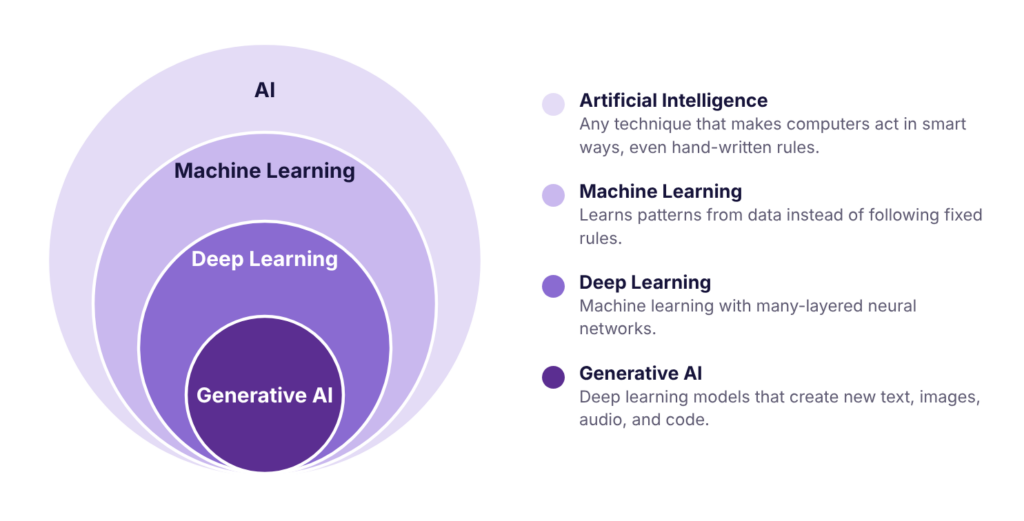
- Artificial intelligence: any technique that makes computers act in smart ways, including hand-written rules.
- Machine learning: AI that learns patterns from data instead of following fixed rules.
- Deep learning: machine learning with many-layered neural networks.
- Generative AI: deep learning models that create new text, images, audio, video, and code.
The field also has subfields that real products combine: computer vision (images and video), natural language processing (human language), robotics (physical machines), reinforcement learning (trial and reward), and search and planning (finding the best sequence of steps, like route planning in a maps app).
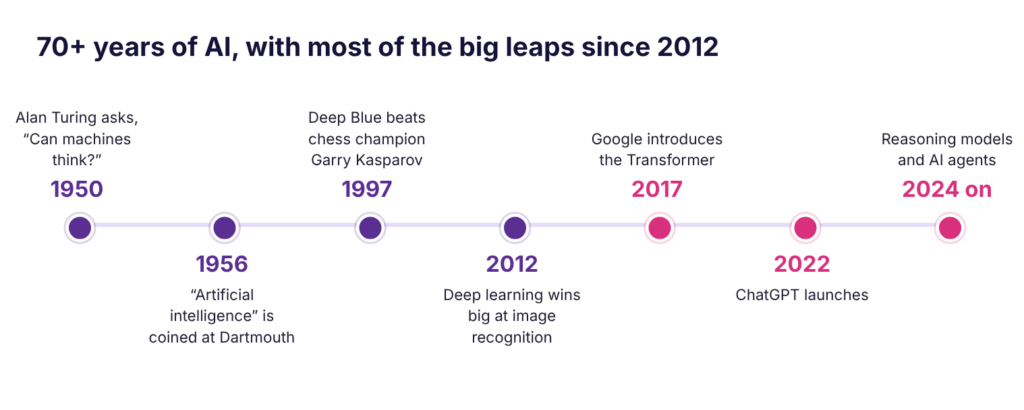
The ideas are over 70 years old. What changed recently is the amount of data, computing power, and a few key breakthroughs.
Why is this helpful for beginners to learn about?
These terms get used interchangeably in the news and in job posts. Knowing which is which helps you understand what a tool can actually do, and why AI handles information at a scale people can’t: processing millions of data points, automating repetitive work, and personalizing experiences.
Is it similar to anything else?
Traditional software also automates tasks, but a programmer writes every rule. With machine learning, the computer learns the rules from examples. A 1997 chess program is AI, but it isn’t machine learning at all.
Example
You probably used AI several times today: search engines rank results, streaming apps recommend shows, spam filters sort your inbox, maps predict traffic, your phone unlocks with your face, and chat assistants answer questions.
AI doesn’t think the way you do. It learns patterns from lots of examples and applies them to new situations. When a photo app recognizes your friend’s face, it hasn’t “met” your friend. It has learned which pixel patterns tend to match that face.
Concept: Machine Learning and Training Data
What is it?
Machine learning builds systems that learn from data instead of following hand-written rules. Instead of writing hundreds of rules to catch spam, you show a model thousands of labeled emails and it learns the patterns itself.
How does it work?
Every machine learning project starts with data. Two terms matter most:
- Features are the inputs: the clues the model looks at.
- Labels are the answers it’s trying to predict.
| Says “free prize”? | Sender in contacts? | Number of links | Label |
|---|---|---|---|
| Yes | No | 7 | Spam |
| No | Yes | 1 | Not spam |
| No | No | 0 | Not spam |
| Yes | No | 12 | Spam |
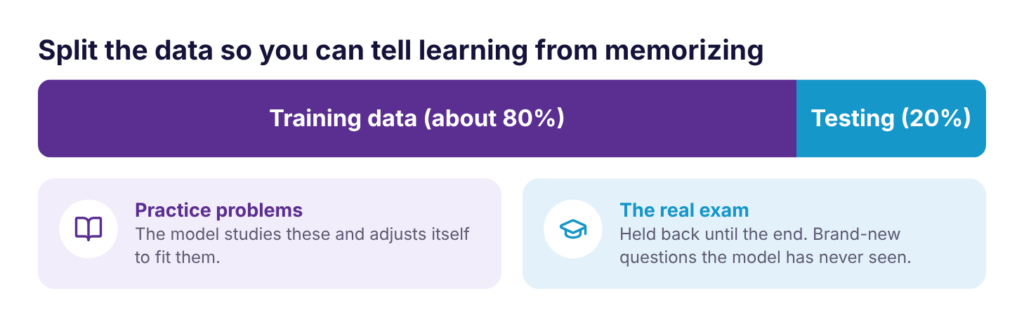
The data is split into training data, which the model learns from, and testing data, which is held back to check whether it really learned.
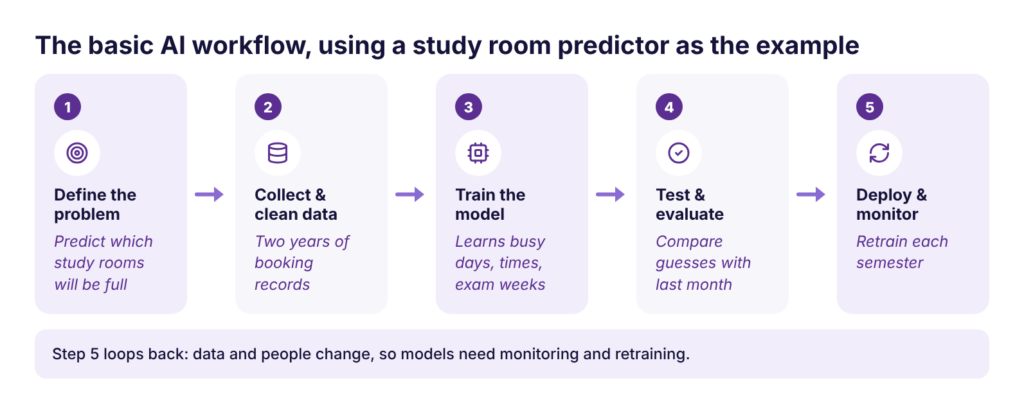
Most projects follow the same five steps, and the last one loops back to the start:
Why is this helpful for beginners to learn about?
Almost every AI system you use was built this way. Understanding it explains both why AI is powerful and why it fails: a model only knows what its data shows it.
Is it similar to anything else?
It’s like studying for an exam. Practice problems are the training data, and the real exam is the testing data. If you only memorize practice answers, you’ll do badly on new questions. A model that does this is overfitting.
Example
To predict which study rooms at College Library will be busy, you’d collect two years of booking records, train a model to find patterns (weeknights and finals weeks fill up), test it against last month’s real bookings, then launch it and retrain it each semester.
Garbage in, garbage out. Good data is relevant, accurate, diverse, and representative of the people or situations the model will face. On most real projects, collecting and cleaning data takes longer than building the model.
Concept: Types of Machine Learning
What is it?
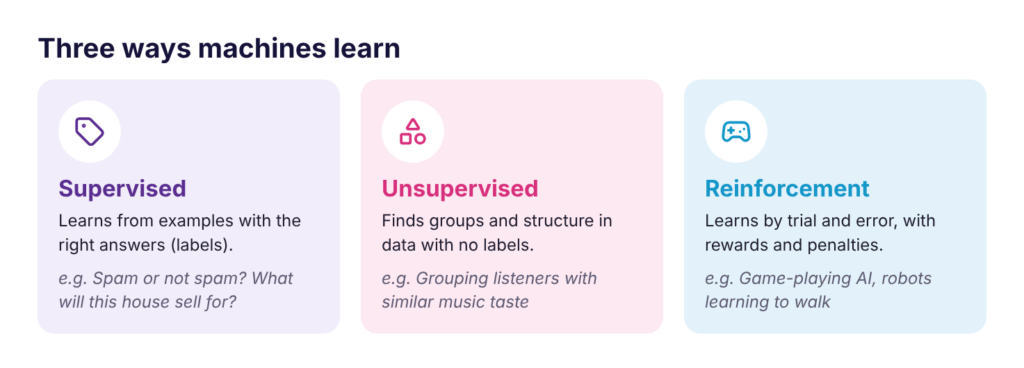
Machine learning comes in three main types, depending on what kind of data and feedback the model gets.
How does it work?
Supervised learning uses labeled data. It comes in two kinds:
- Classification predicts a category: spam or not spam, fraud or legitimate, cat or dog, positive or negative review.
- Regression predicts a number: a house price, tomorrow’s temperature, delivery time, next month’s sales.
Unsupervised learning uses data with no labels. The most common task is clustering, which groups similar items together based on similarity alone.

Reinforcement learning works by trial and error. An agent observes its situation, takes an action, gets a reward or penalty, and improves its strategy to earn more reward over time.
Why is this helpful for beginners to learn about?
Knowing the type tells you what data a project needs. Supervised learning needs labeled examples, which can be slow and expensive to make. Unsupervised learning works without labels. Reinforcement learning needs a way to score actions.
Is it similar to anything else?
Supervised learning is like studying with an answer key. Unsupervised learning is like sorting a pile of photos into groups without being told the categories. Reinforcement learning is like training a dog with treats.
Example
- Supervised: your email’s spam filter
- Unsupervised: a music app grouping listeners with similar taste to build playlists
- Reinforcement: AlphaGo learning to beat world champions at Go, and chatbots being polished with human ratings
In clustering, the model finds the groups, but a person still decides what each group means.
Concept: Probability and Confidence
What is it?
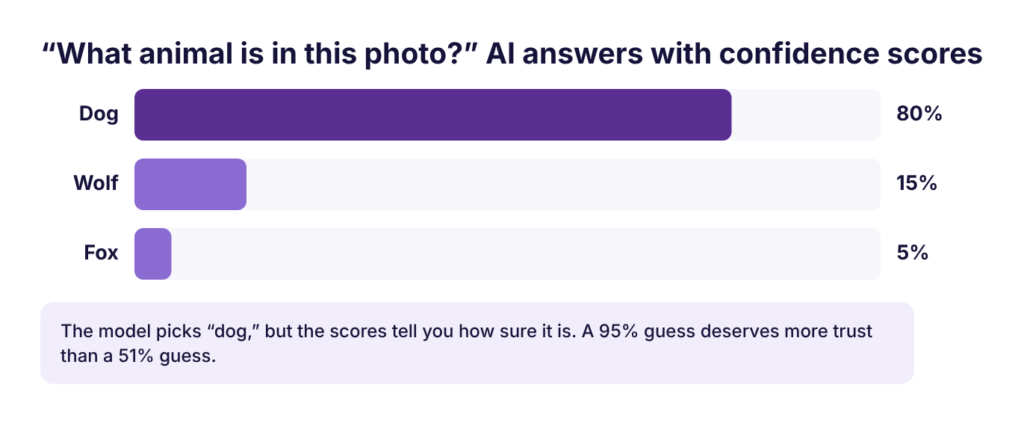
AI rarely knows anything for certain. Probability lets a model express how confident it is in each possible answer, instead of a simple yes or no.
How does it work?
A model scores every possible answer and picks the highest one. The score is its confidence.
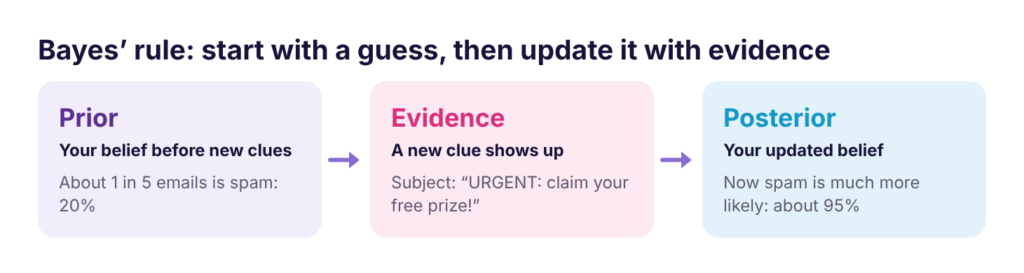
Good systems also update their guesses as new evidence arrives. This is called conditional probability: the chance of something given what you already know. Bayes’ rule is the math for it: start with a prior belief, add evidence, and get an updated posterior belief.
Statistics helps here too. Models rarely see all the data in the world, so they estimate from samples: averages, rates like how often people click a recommendation, and how much the data varies.
Why is this helpful for beginners to learn about?
Confidence tells you how much to trust an answer. A 95% guess and a 51% guess can give the same label, but they deserve very different levels of trust.
Is it similar to anything else?
A weather forecast works the same way. “70% chance of rain” is a confidence score, and forecasters update it as new data comes in.
Example
A medical test result can suggest a disease without proving it. Probability captures how likely the disease is, and that likelihood changes as more test results come in.
Correlation vs. Causation
AI is great at finding correlations, things that change together. It can’t tell you causation, what actually makes something happen. Ice cream and sunglasses sales both rise every summer, but hot weather causes both. Deciding cause is still a human job.
Concept: Evaluating a Model
What is it?
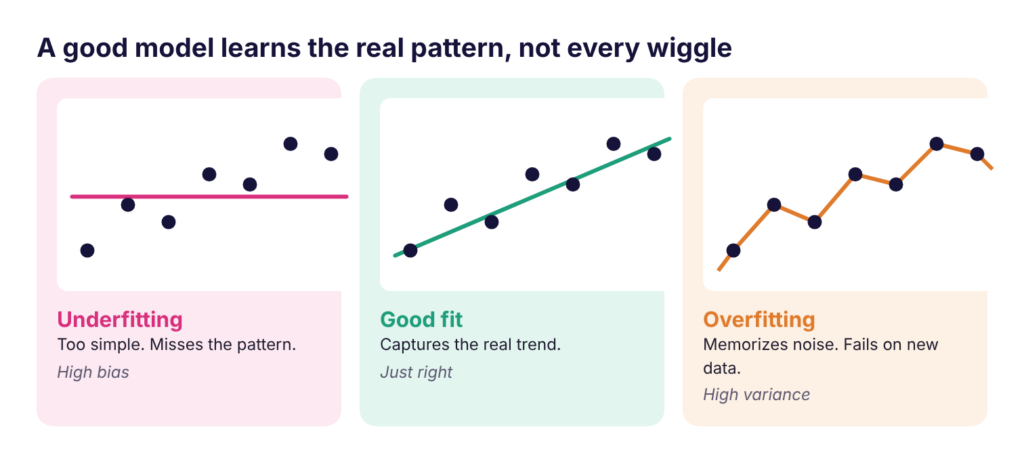
Evaluation checks how well a model works on data it has never seen. The goal is a model that generalizes: one that learned the real pattern, not just its training examples.
How does it work?
First, check the fit. A model can be too simple (underfitting, also called high bias) or too complex (overfitting, also called high variance).
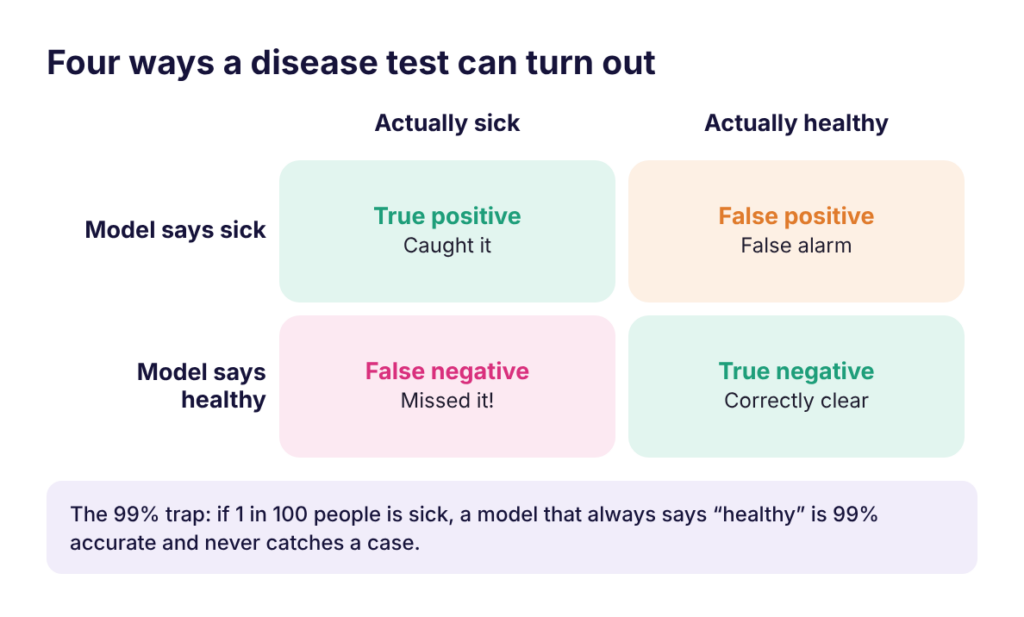
Then, look at the kinds of mistakes it makes, not just overall accuracy:
Why is this helpful for beginners to learn about?
Accuracy alone can fool you. If 1 in 100 people has a disease, a model that always says “healthy” is 99% accurate and never catches a single case.
Is it similar to anything else?
It’s like grading a smoke detector. One that never goes off is “right” on most days, and useless in a fire. One that goes off every time you make toast is annoying, but safer.
Example
For a disease screening tool, a false negative (missing a sick patient) is usually far worse than a false alarm. For a spam filter, a false positive (sending a real email to spam) may be the worse mistake. Pick how you measure a model based on the cost of each mistake.
Concept: Neural Networks and Deep Learning
What is it?
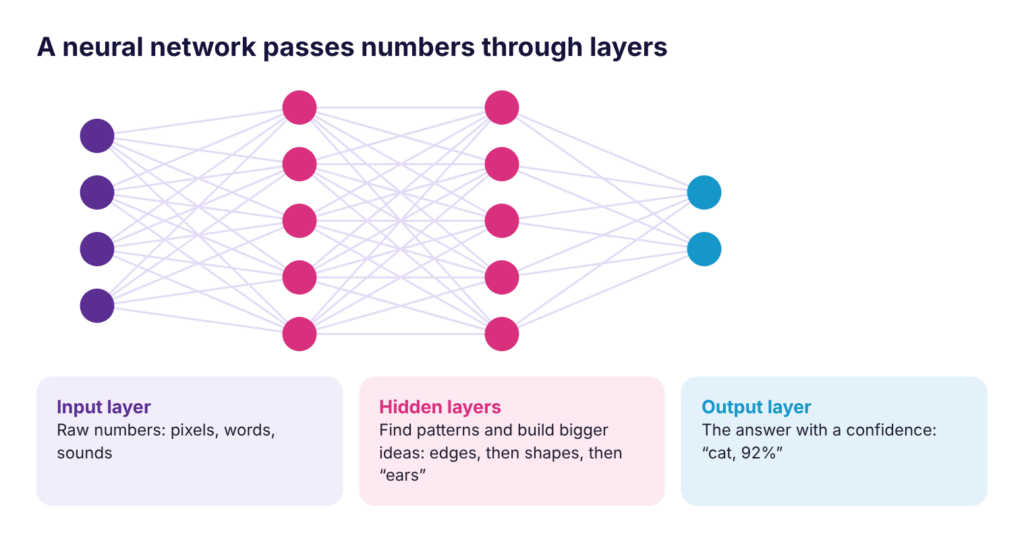
A neural network is a model made of layers of small connected units, loosely inspired by neurons in the brain. Deep learning means a network with many layers.
How does it work?
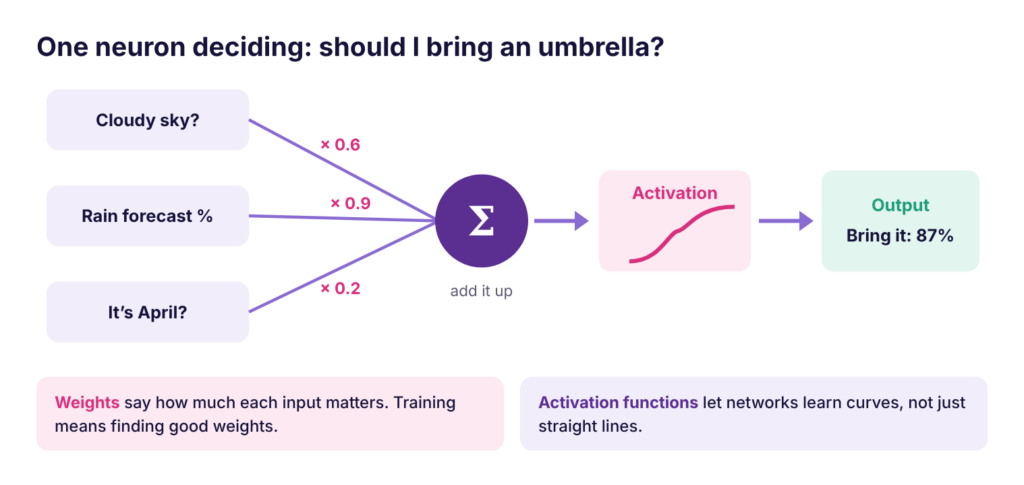
Each unit takes in numbers, multiplies each by a weight (how much it matters), adds them up, and passes the total through an activation function, which lets the network learn curvy, complex patterns instead of only straight lines. The simplest version of this unit is called a perceptron.
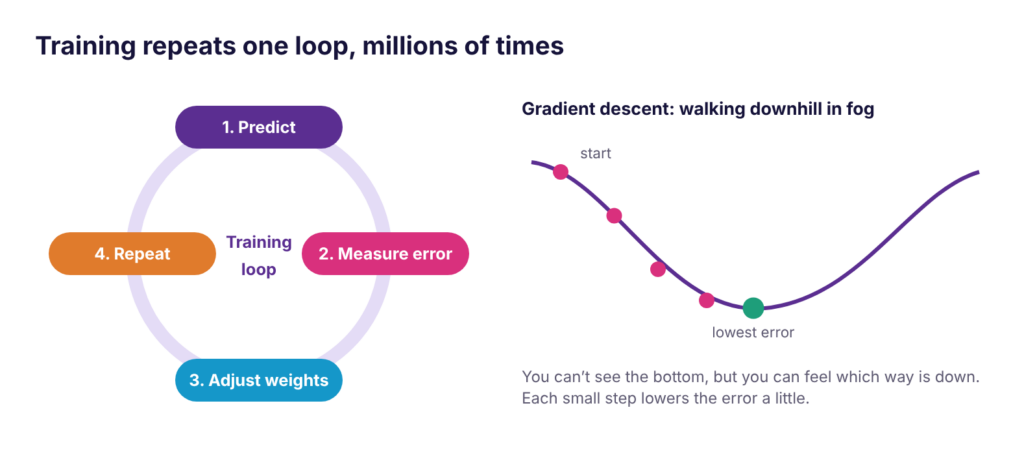
Training adjusts the weights over and over: predict, measure the error, nudge the weights, repeat. The method for choosing which way to nudge them is called gradient descent.
In a deep image model, early layers spot edges, middle layers find shapes and textures, and later layers recognize whole objects.
Why is this helpful for beginners to learn about?
Neural networks power almost all modern AI: face unlock, speech-to-text, translation, self-driving perception, and every chatbot. The largest have billions of weights.
Is it similar to anything else?
Gradient descent is like walking downhill in thick fog. You can’t see the bottom, but you can feel which way the ground slopes, so you take a small step down and check again.
Example
Computer vision is a common use. To a computer, a photo is a grid of pixel numbers. A vision network learns which patterns of numbers mean “stop sign,” “cat,” or “tumor on an X-ray.” Tasks include image classification, object detection, and face recognition, which also raises real privacy questions.
Concept: Embeddings
What is it?
An embedding is a list of numbers (a vector) that captures the meaning of something: a word, an image, a song, a product, or a user.
How does it work?
AI represents everything as numbers. A collection of vectors is stored in a matrix, and linear algebra lets computers process them efficiently. Things with similar meaning get similar vectors, so they land close together.
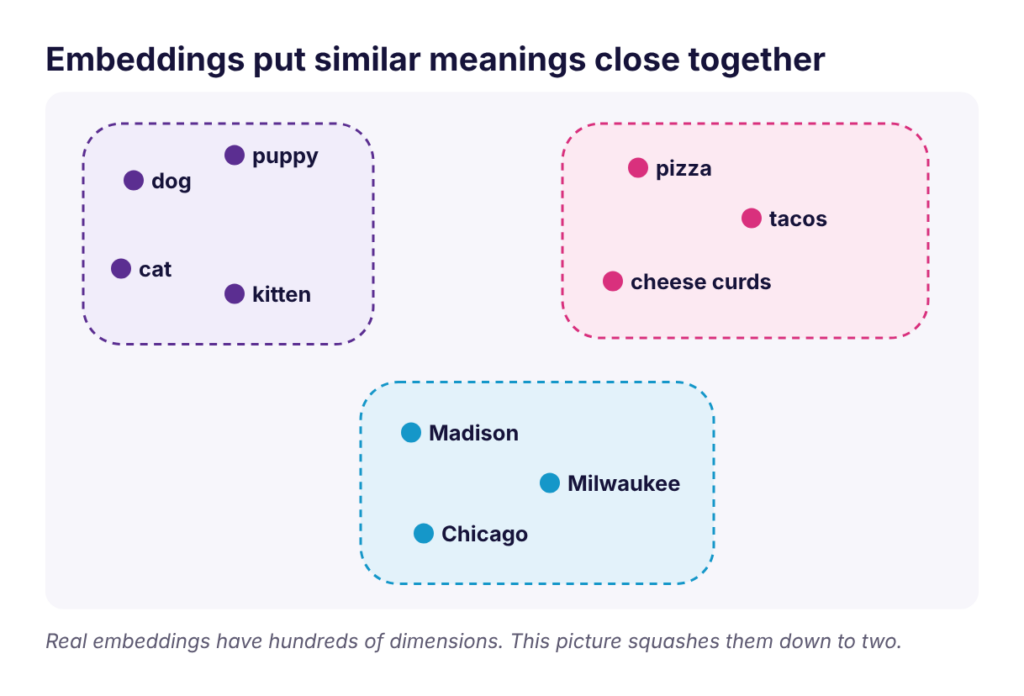
Real embeddings have hundreds or thousands of dimensions. Dimensionality reduction methods like PCA (principal component analysis) squash them down so people can visualize them, keeping the most important structure.
Why is this helpful for beginners to learn about?
Embeddings explain how AI “understands” meaning. They’re the reason search can find what you meant, not just what you typed.
Is it similar to anything else?
It’s like a map. Cities that are close on a map are near each other in real life. Words that are close in embedding space are close in meaning.
Example
- Search that understands “cheap laptop for college” matches “affordable student notebook”
- “You might also like” recommendations on shopping and music apps
- Language models representing every word they read
Concept: Large Language Models (LLMs)
What is it?
A large language model (LLM) is a neural network trained on a huge amount of text to predict what comes next. LLMs power chat assistants like ChatGPT, Claude, Gemini, and Copilot. They’re a type of generative AI, which creates new content instead of only sorting or predicting.

How does it work?
LLMs are built on the Transformer, a design introduced by Google researchers in 2017. Its key idea is attention: for each word, the model looks at every other word and decides which ones matter most. In “The trophy didn’t fit in the suitcase because it was too big,” attention works out that “it” means the trophy.
When it writes, an LLM scores every possible next piece of text, picks one, adds it, and repeats until the answer is done.
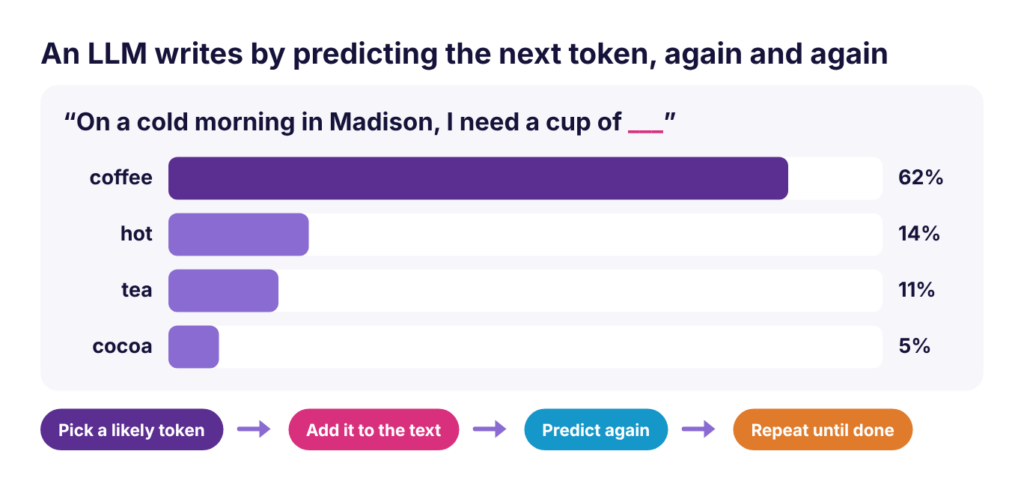
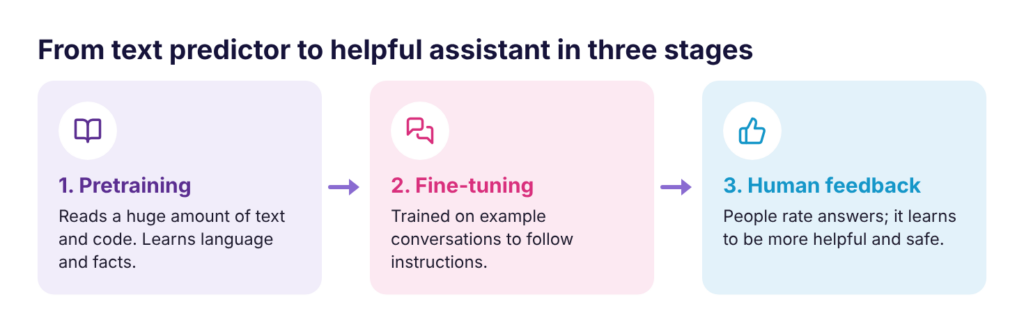
A chat assistant goes through three stages of training to get from text predictor to helpful assistant:
Why is this helpful for beginners to learn about?
Knowing that an LLM predicts likely text, rather than looking up facts, explains both its strengths (fluent writing, explanation, coding) and its biggest weakness: it can sound right and be wrong.
Is it similar to anything else?
It’s like your phone’s autocomplete, scaled up enormously. Autocomplete suggests the next word; an LLM keeps going for whole essays, using everything in the conversation as context.
Example
Ask the same question twice and you may get two different answers. There’s a bit of randomness in each pick, so the model doesn’t always choose the single most likely word.
Reasoning and Multimodal Models
Newer reasoning models “think” before answering: they work through a problem step by step and check their work. They’re slower but much better at math, coding, and planning. Multimodal models take in more than text, like photos, screenshots, PDFs, and voice.
Natural Language Processing
LLMs are the newest part of natural language processing (NLP), the area of AI focused on human language. NLP also includes translation, summarization, question answering, sentiment analysis, and spam detection. Language is hard for computers because meaning depends on context, tone, culture, and ambiguity.
Concept: Tokens and Context Windows
What is it?
Tokens are the chunks of text an LLM actually reads, often pieces of words. The context window is everything the model can “see” at once.
How does it work?
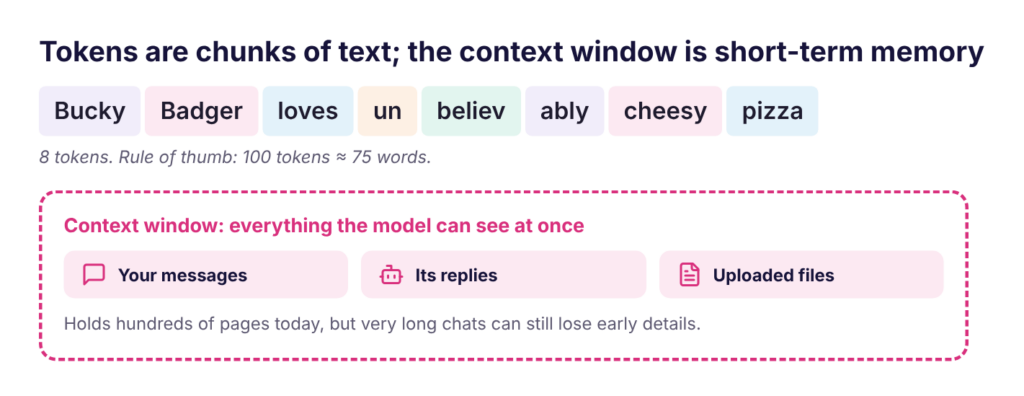
- As a rule of thumb, 100 tokens is about 75 words.
- The context window holds your messages, the AI’s replies, and any files you upload.
- Today’s models can hold hundreds of pages at once, but very long chats can still lose track of early details.
Why is this helpful for beginners to learn about?
Usage limits and pricing for AI tools are counted in tokens. And understanding the context window explains why a chat “forgets” things, and how to fix it.
Is it similar to anything else?
The context window is like short-term memory, or the whiteboard in a meeting. Everything written on it is in view; once it fills up or you start a new meeting, older notes are gone.
Example
If a long chat starts giving worse answers, open a New chat and paste in a short summary of only what matters.
Concept: Hallucinations
What is it?
A hallucination is when an AI states something false with total confidence, like a made-up fact, quote, statistic, or citation.
How does it work?
LLMs predict what sounds right, not what is true. They have no built-in fact check, and they’re trained to always give an answer, so gaps in their knowledge get filled with plausible-sounding text.
Why is this helpful for beginners to learn about?
This is the single most important limitation to understand before relying on AI for school or work.
Is it similar to anything else?
It’s like a student who didn’t do the reading but answers confidently anyway. The answer might sound great and still be wrong.
Example
Ask for “three research papers on this topic, with authors and years,” then search for each one. Often at least one doesn’t exist.
Watch out for: citations, quotes, and links; very specific numbers, dates, and names; niche or very recent topics; and math done “in its head.” Ask for sources and open them, turn on web search or give it your own documents, and double-check anything you’ll submit or act on.
Concept: Retrieval-Augmented Generation (RAG)
What is it?
RAG means the AI looks up relevant information before it answers, then writes its answer from those sources.
How does it work?
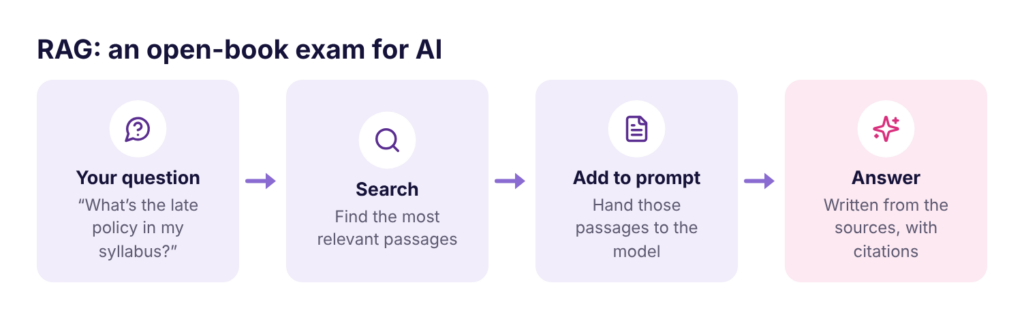
Why is this helpful for beginners to learn about?
RAG makes answers more accurate and current, and lets you check them through citations. It cuts down on hallucinations, though it doesn’t remove them.
Is it similar to anything else?
It’s an open-book exam instead of answering from memory.
Example
- Copilot or ChatGPT with web search turned on
- Google’s NotebookLM answering questions from your course readings
- A support chatbot that answers from a company’s help pages
Technique: Writing Good Prompts
What is it?
A prompt is what you type to an AI. Prompting is the skill of giving it the context and instructions it needs to give you a useful answer.
How do you use it?
A strong prompt often has five parts:
| Part | What it tells the AI | Example |
|---|---|---|
| Context | Who you are and what it’s for | “I’m a first-year biology student studying for a quiz.” |
| Task | Exactly what you want | “Explain photosynthesis.” |
| Constraints | Length, level, tone, limits | “In under 150 words, using a simple everyday analogy.” |
| Format | How the answer should look | “Then give me 3 practice questions, with answers at the end.” |
| Examples | What good looks like | Paste a sample answer or a style you like |
Then treat it as a conversation. Habits that help:
- Follow up. Your first prompt is a draft. Ask for “shorter,” “more examples,” or “try again.”
- Share your material. Paste notes or attach files so it works from your stuff, not guesses.
- Let it ask you. End with “Ask me any questions you need before you start.”
- Break it up. Ask for an outline first, then each section.
- Check the work. Ask it to review its answer, then verify the important parts yourself.
Why is this helpful for beginners to learn about?
The same tool gives dramatically better results with a better prompt. It’s the most useful AI skill you can build, and it works in every chat assistant.
Is it similar to anything else?
It’s like briefing a new teammate or writing a good email to a TA. The more specific you are about what you need, the better the help you get.
Example
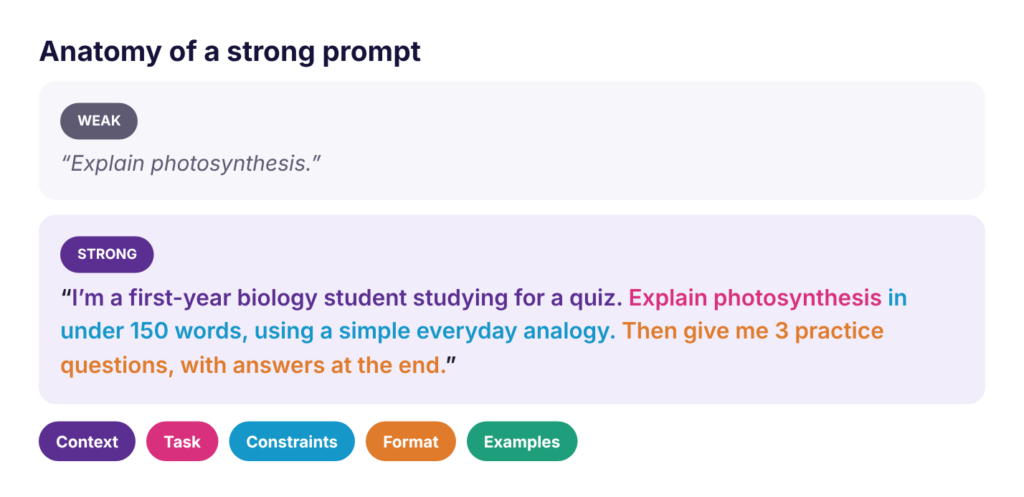
You don’t need all five parts every time. Adding even two makes a big difference.
Concept: AI Agents
What is it?
An AI agent is an AI system that works toward a goal by planning, using tools, and taking actions, instead of only answering a question.
How does it work?
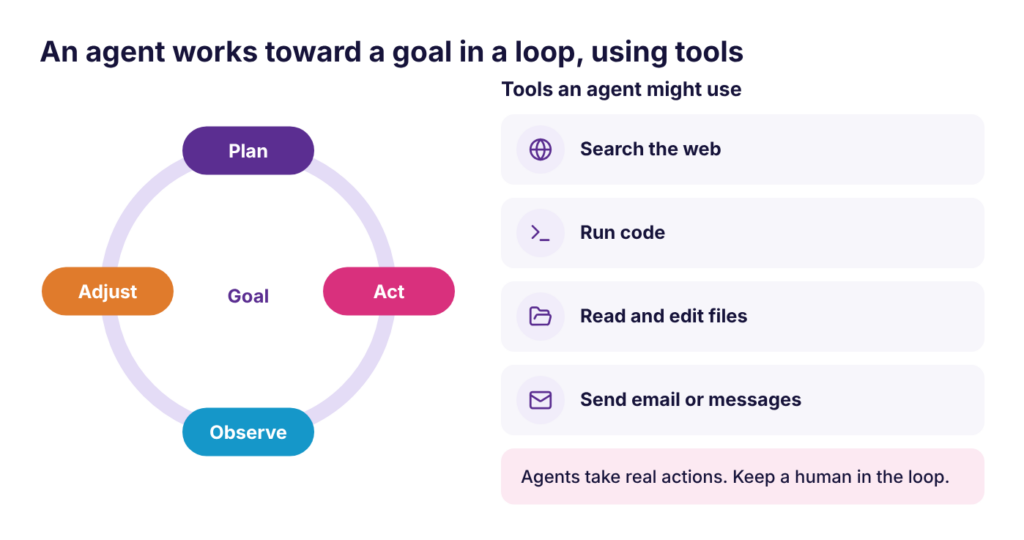
Agents connect to tools through standards like MCP (Model Context Protocol), an open standard that lets AI apps plug into services like Google Drive, GitHub, or Slack.
Why is this helpful for beginners to learn about?
Agents are where AI is heading: from writing about a task to actually doing it. Knowing how they work helps you use them safely.
Is it similar to anything else?
A chatbot is like asking a librarian a question. An agent is like asking a research assistant to go find sources, read them, and write up a summary for you. MCP is like a USB port for AI.
Example
- Deep research tools that read dozens of web pages and write a report
- Browser agents that fill out forms
- Coding agents that edit, run, and test a whole project
Agents can take real actions, like sending messages or deleting files. Keep a human in the loop for anything that matters.
Technique: Vibe Coding
What is it?
Vibe coding means building software by describing what you want in plain English and letting AI write the code. AI researcher Andrej Karpathy coined the term in early 2025.

How do you use it?
Work in small loops and test after every change:
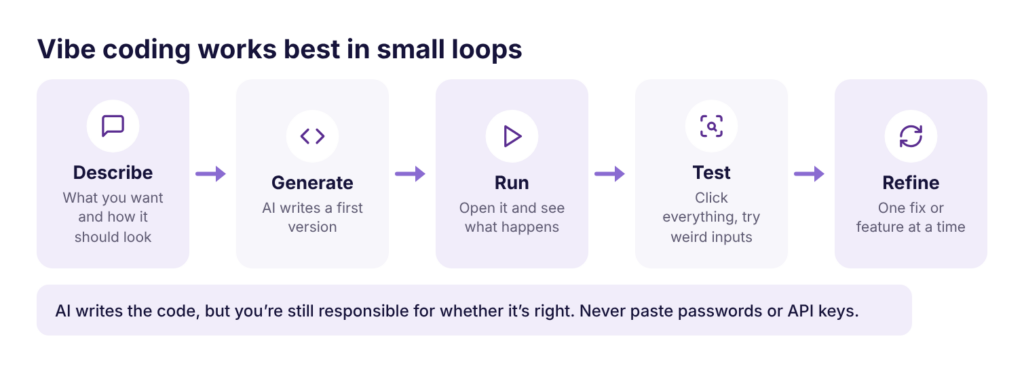
- Start small. Get a tiny version working before adding features.
- Ask why. Have the AI explain any code you don’t understand.
- Save versions. Keep copies (or use Git) so you can undo mistakes.
Why is this helpful for beginners to learn about?
Anyone can now build small tools, websites, and prototypes without years of programming experience. It’s also a great way to see how code works.
Is it similar to anything else?
Popular tools include Claude Code, Cursor, GitHub Copilot, Replit, Lovable, and v0. Any chat assistant, including Copilot Chat, can write simple apps too.
Example
Ask Copilot Chat: “Write a single HTML file for a Pomodoro study timer with start, pause, and reset buttons.” Save it as an HTML file (see Saving and Opening an HTML File below), open it in your browser, then ask for one improvement at a time.
Watch out for code you don’t understand, security holes, and bugs that pile up quietly. Never paste passwords or API keys into prompts or code. In a programming class, check the course AI policy first.
Tool: Teachable Machine
What is it?
A free website from Google that lets you train your own image, sound, or pose recognition model in the browser, with no code.
How do you use it?
- Go to teachablemachine.withgoogle.com and click Get Started.
- Choose Image Project, then Standard image model.
- Rename each class to the things you want to tell apart (click the pencil icon next to its name).
- Add examples to each class with Webcam (click and hold Hold to Record) or Upload.
- Click Train Model, and keep the tab open while it trains.
- Test your model in the Preview panel. The bars show its confidence for each class.
Why is this helpful for beginners to learn about?
You see the whole machine learning workflow in about ten minutes: collect data, label it, train, and test. It makes training data and confidence scores concrete.
Is it similar to anything else?
It’s a simplified version of what data scientists do with tools like Python, TensorFlow, and PyTorch.
Example
Make two classes, “Thumbs up” and “Thumbs down,” record about 50 images of each, and train. Then change the lighting or background and watch the confidence scores drop. That shows why training data needs variety.
Technique: Saving and Opening an HTML File
What is it?
An HTML file is a web page saved on your computer. You can open it in any browser with no internet or hosting needed, which makes it the fastest way to run a small app that AI writes for you.
How do you use it?
On Windows: open Notepad, paste the code, click File > Save As, set Save as type to All files, and name the file something like timer.html. Double-click it to open it in your browser.
On a Mac: open TextEdit, click Format > Make Plain Text first, paste the code, click File > Save, name it timer.html, and choose Use .html if asked. Double-click it to open it.
Why is this helpful for beginners to learn about?
It lets you try vibe coding without installing anything.
Is it similar to anything else?
It’s like saving a document, except the browser runs it as a web page instead of showing text.
Example
After any change to the code, save the file again and refresh the browser tab to see it.
On a Mac, the Make Plain Text step matters. Without it, the browser shows code instead of your app. On Windows, make sure the file isn’t saved as timer.html.txt.
Concept: Using AI Responsibly
What is it?
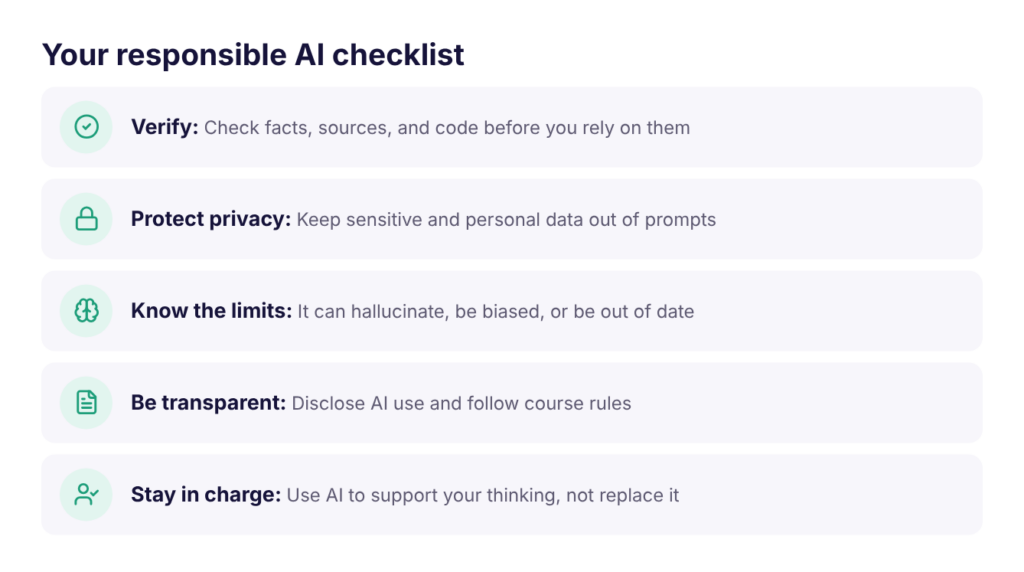
Responsible AI use means using AI in ways that are fair, safe, private, honest, and accountable. AI affects real people, so a system can be impressive and still cause harm.
How does it work?
Ask four questions about any AI system: Fairness (does it treat all groups equally well?), Privacy (whose data was used, and how is yours protected?), Safety (could it spread false information or deepfakes?), and Accountability (who is responsible when it’s wrong?).
Bias: if training data reflects unfair patterns from the past, the model learns and repeats them. Teams reduce bias with diverse, representative data, by testing accuracy for each group, and with human review of high-stakes decisions.
Explainability: in healthcare, hiring, finance, education, and law, people need to understand why an AI made a decision so it can be checked and challenged.
Your data: anything you type into an AI tool leaves your computer. Free consumer tools may use your chats to improve their models unless you turn that off.
Don’t paste: sensitive or restricted university data (even into Copilot Chat), other people’s personal information like student records or health details, passwords, API keys, financial information, or unpublished research without permission.
Coursework: every course sets its own AI rules, and they can differ between assignments. Check the syllabus, ask your instructor when unsure, disclose how you used AI, keep your prompts and drafts, and remember you’re responsible for everything you submit.
Why is this helpful for beginners to learn about?
AI mistakes can affect grades, jobs, health, and privacy. Good habits protect you and the people your work affects.
Is it similar to anything else?
It’s like citing sources and protecting passwords: basic habits that become second nature once you practice them.
Example
Amazon scrapped an experimental hiring tool in 2018 after it learned, from ten years of past résumés, to downgrade résumés that mentioned women’s groups. The model learned the bias in its history.
Glossary
| Term | Meaning |
|---|---|
| Activation function | The step in a neuron that bends the math, so networks can learn complex patterns |
| Agent | An AI system that plans, uses tools, and takes actions toward a goal |
| Algorithm | A step-by-step set of instructions a computer follows |
| Attention | The Transformer’s way of deciding which words matter most to each other |
| Bias (data) | Unfair patterns in data that a model learns and repeats |
| Classification | Predicting a category, like spam or not spam |
| Clustering | Grouping similar items together without labels |
| Context window | Everything a language model can see at once in a conversation |
| Deep learning | Machine learning with neural networks that have many layers |
| Dimensionality reduction | Compressing many features into fewer while keeping the important structure (for example, PCA) |
| Embedding | A list of numbers that captures meaning; similar things get similar numbers |
| Features | The inputs a model uses to make a prediction |
| Fine-tuning | Extra training that adapts a model to a specific job, like following instructions |
| Generative AI | AI that creates new text, images, audio, video, or code |
| Gradient descent | The method for adjusting weights a little at a time to reduce error |
| Hallucination | When an AI states something false with confidence |
| Labels | The correct answers a model learns to predict |
| Large language model (LLM) | A model trained on huge amounts of text to predict the next token |
| Machine learning | AI that learns patterns from data instead of following fixed rules |
| MCP | Model Context Protocol, an open standard for connecting AI apps to other tools |
| Overfitting | When a model memorizes training data and fails on new data |
| Perceptron | The simplest unit of a neural network: weighted inputs, summed, then an output |
| Prompt | The instructions or question you give an AI |
| RAG | Retrieval-augmented generation: the AI looks up sources before answering |
| Regression | Predicting a number, like a price or temperature |
| Reinforcement learning | Learning by trial and error with rewards and penalties |
| Token | A chunk of text, often part of a word, that a language model reads |
| Transformer | The neural network design behind modern chatbots, built around attention |
| Underfitting | When a model is too simple to capture the pattern |
| Vector | A list of numbers; how AI represents words, images, and users |
| Vibe coding | Building software by describing it in plain English and letting AI write the code |
| Weight | A number in a neural network that says how much an input matters |
Further Reading and Resources
All of these are free.
- Elements of AI: a beginner-friendly online course on AI basics, no coding needed
- 3Blue1Brown: Neural Networks: visual videos on how neural networks and LLMs work
- Andrej Karpathy: Intro to Large Language Models: a one-hour talk on how chatbots are built
- Google Machine Learning Crash Course: hands-on machine learning with interactive exercises
- Kaggle Learn: short Python and machine learning lessons in the browser
- Teachable Machine: train your own model in the browser
- Microsoft 365 Copilot Chat at UW-Madison: access instructions and data rules
- Software Training for Students: more free workshops, office hours, and 1-on-1 help