Welcome to Software Training for Students!
We are glad to have you on board and look forward to helping you get up to speed in your new role.
This page will cover most of what you can expect as a trainer at STS and point you to the resources that will be helpful as you get started.
A lot of the information here was covered during orientation, but there are a few sections with important new details, so we ask that you go through it completely at least once.
Table of Contents:
What Is My Job, Exactly?
Trainers have the chance to complete many different activities and projects while working at STS, but most STS Tasks fall into the following categories: Training, Learning, Creating/Updating, and Participating.
Training
In this context, ‘teaching’ means helping other students gain new skills and understand topics in the technology space. It is arguably the most important thing we do at STS, and usually the most enjoyable part of the job.
Training at STS takes the following forms. Make sure to click on each linked page to learn more in-depth about each kind of STS training responsibility:
- Teaching or Assisting Workshops
- Providing Individual Support via:
- 1-on-1 Appointments (submitted by students in advance via the STS website)
- Office Hours Drop-ins
Learning
Another main job of the STS trainer is to learn new programs/software and deepen their skills on the ones they already know. This can take many forms, and trainers are encouraged to do what works best for their personal learning style.
There are two main reasons we prioritize learning at STS.
- To maximize the number of trainers on staff who can train any given topic. One of the big logistical challenges we face at STS is to have qualified trainers available at the time for which a given workshop is requested. If we only have 2 trainers who know SQL and both are busy during the time a student org requests an SQL workshop, we may not be able to fulfill their request, which is not ideal. The more trainers we have who know a given topic, the better STS operates. It increases our ability to meet the needs of the students we serve, and it leads to better trainers as well.
- To help our trainers become more experienced users of technology themselves so they can succeed during – and after! – their time with STS. The single most important tech skill a person can have is to know how to learn new technology. The best way to get better is to practice – and so we encourage our trainers to take the steps to add new skills to their repertoire, and in fact we make it a part of the job – meaning you can get paid for time spent learning things that help you as a trainer at STS. When applying for jobs or internships, something like knowing how to format documents in InDesign or write simple automation scripts in Python can give you an edge over other candidates when all other things are equal.
Trainers aren’t expected to know everything, but the goal is for trainers to gain new knowledge and skills so they can increase their range of training possibilities over time. We suggest that trainers try to add at least 1 new workshop to their qualifications each semester.
Some ways to do this include:
- Go through STS materials for workshops/manuals you don’t know yet
- Attend STS Evening Workshops as a student learner
- Make 1-on-1 Appointments with your fellow STS trainers
- Find and watch videos on LinkedIn Learning, Codecademy, Udemy, YouTube, etc.
- Research things online
Learning can be done during scheduled Office Hours and remotely at any location and time!
Creating/Updating
Another core job of STS trainers is to keep our training materials relevant and approachable! This can be done by developing new training manuals from scratch, updating exercises for existing training materials, or curating existing online resources for students to learn from.
If you are interested in updating or creating an STS Workshop, be sure to let the managers know during your check-in! They will help guide you through the process and share any existing STS materials you can reference, or connect you with other trainers interested in helping (or possibly are even working on it already)!
- Be sure to check out our guide to writing STS manuals for a primer on how to create effective training materials.
- Having more example projects and class activities is better for trainers and learners alike, so don’t hesitate to try your hand at putting together new ones. Just found out about a neat new technique in Photoshop? Try making an exercise, project, or class activity for it. Have an idea for a way to learn for loops or conditionals in JavaScript? Write an exercise for it.
Creating and updating training materials can be done during scheduled Office Hours and remotely at any location and time!
Participating
In addition to training-related work, STS trainers are expected to stay engaged in the other STS activities that we have going on. These activities are opportunities to learn more about, share, and improve our STS services, as well as get to know team members a little more in the process! The other STS activities that STS trainers can contribute to include:
Attending Meetings
- Check-In Meetings
- Every other week, trainers meet with one of the managers to check in on how life is going for them. These cover STS-related work and activities, but are also a chance to see how things are going for the trainers overall – academically, personally, and beyond.
- Understanding what’s going on with trainers’ lives is an important part of being able to manage a service like STS successfully, and these meetings are the primary way that the managers are able stay connected with the trainers.
- At the start of every semester, STS managers send out recurring Outlook calendar invites to trainers for their virtual check-ins based on their availability. Check-in meetings tend to be one of the more flexible events in the STS schedule, and it is usually not a problem if the trainer or manager needs to postpone, reschedule, or cancel a meeting now and then.If a trainer isn’t able to attend their scheduled check-in meeting, it’s important that they let Pete and/or Naty know. There aren’t any specific consequences or strikes for missing check-ins, but it reflects badly on you to just not show up for something you previously agreed to attend, with no explanation.
- Kick-Off and Wrap-Up Events
- STS holds a meeting at the beginning and end of every semester, the Kick-Off and Wrap-Up meetings. These are when the managers give updates about the upcoming semester and/or an overview of how the previous semester went, make announcements that trainers should know about and just connect with the group.
- Attendance at the kick-off and wrap-up meetings is strongly encouraged. These are not strictly mandatory (meaning you won’t get penalized if you can’t make it), but the managers ask trainers to attend if at all possible. These events are the only times we’re able to get the whole team together in one place, so we ask trainers to do their best to be able to attend them. Plus, there’s food from some of the many delicious local restaurants!
Joining Leadership Teams
Joining an STS Leadership Team offers more opportunities for trainers to work together, improve leadership skills, and helps STS be a more enjoyable place to work at. All Leadership Teams are trainer-led and teams are expected to meet regularly and eventually communicate updates with the rest of the STS Team, usually once a month. Participation in Leadership Teams is not required, but highly encouraged! Leadership Teams currently include:
- Social Media and Marketing
- Create posts on upcoming workshops, current trainers, software tips/tricks, etc.
- Select and design goodies to hand out at tabling events
- Design the next STS Team apparel
- Create posters to place across campus or within the DesignLab space
- Take pictures at all STS events (teambuilding, tabling, staff meetings)
- Organize social media opportunities for all trainers to contribute to (i.e. “Day in the Life”, trainer celebration posts)
- Teambuilding
- Select the kinds of social events for trainers throughout the semester
- Plan logistical info for each event selected (i.e. making reservations, creating agenda if necessary)
- Communicate social events to the rest of the team (i.e. through emails, Teams, calendar invites)
- Foster an inviting and warm space for all trainers at each event
- Ensure pictures are being taken at each event
- Outreach
- Identify and reach out to Student Orgs that could benefit from STS services
- Identify specific courses that could benefit from STS services
- Help plan an on-campus event to promote STS services mid to late into the semester
- Work with the Social Media and Marketing Team to promote ideas as needed
Staffing the STS table
STS is a part of many tabling events to help spread awareness about our services to other students on campus! Trainers are expected to help cover one (or more!) shifts for at least 2 tabling events throughout their time at STS. These events typically include:
- Student Org Fair
- New Graduate Student Welcome Resource Fair
- International Student Welcome and Information Fair
- College Library Semester Start-Up
- Open House events for our partners
General Communication and Attendance Expectations
Our Responsibilities to Campus
Software Training for Service is a campus service, meaning UW-Madison provides DoIT with the funding that pays for what we do. The majority of this funding goes towards labor costs (e.g. paying the trainers and managers), and also covers things like the marketing items we provide at campus events, sponsorship fees for the student org fairs, etc.
STS managers do their best to make STS a healthy, enjoyable, sustainable place to work. We want trainers to be able to attend to ALL of their responsibilities, including their class work, student orgs and other jobs, and taking care of their health, which is why we do our best to be flexible when it comes to trainers’ tasks and obligations.
Flexibility around scheduling is an important part of the work environment we try to maintain at STS, but as a tuition-funded campus service, our top priority needs to be delivering the services that campus pays us to provide. If we aren’t able to do that, campus will not keep us around. Which is not what any of us want! With that in mind, we ask trainers to be proactive with timely communication and effective preparation towards all of their STS responsibilities to ensure students receive the highest quality training within a reasonable timeframe.
Scheduling
Trainers get scheduled for Evening Workshops (teach), Requested Workshops, check-ins, staff meetings, and other STS events by STS Managers based on their availability and skillset. STS managers also officially schedule all Office Hours and Evening Workshop Assists after trainers have signed up for them on the various spreadsheets.
- Communicate Availability!
- Your Outlook calendar is how the STS managers know whether you are available for STS obligations. It’s your job to make sure this is blocked off with any time that you can’t or would prefer not to work for STS.
- When You Are Scheduled:
- You will receive an invite on their Outlook calendar with the name/topic, location, and time of the meeting or workshop.
- Within 48 hours of receiving an invitation, trainers are expected to accept the invite as a way to confirm to STS managers that the invite went through.
- If a trainer realizes they are unavailable during that time (i.e. they forgot to add an exam to their calendar), they are expected to decline the invite and message STS Managers right away as to why they can’t attend.
- Once you are scheduled for an STS event (meaning it appears on your Outlook calendar and on your STS website dashboard), it is your responsibility to attend or communicate that you will not be able to attend.
- What if I can’t attend an STS responsibility I originally accepted?
- We understand that life as a student can be unpredictable, and things sometimes come up that conflict with your duties as a trainer – exams getting rescheduled, study sessions happening during workshops, etc. This is normal, and expected.
- When things come up that conflict with your STS duties, it is your responsibility let the STS managers know as far in advance as possible, ESPECIALLY for a workshop you’re scheduled for.
- If there is an emergency (sickness, urgent family situation, etc.) the day of a workshop, let the STS managers know yourself or have someone else (roommate, friend, etc.) contact the STS managers as soon as you can.
Communication via Microsoft Teams and Email
Most of our communication at STS is done via Teams, although STS managers will occasionally send out team updates and work requests via email.
- Make sure your Teams notifications are on
- Ensure you have access to the General Channel and Office Hours Channel
- STS managers expect trainers will look at their Teams messages regularly and respond within 24 hours of being messaged.
Consequences For Missing Events
Missing STS events that you are responsible for is never good, but not all missed events are created equal, and the severity of missing a particular event will vary based on what kind of event was missed. Specific consequences for each kind of STS Task (Evening Workshops, Requested Workshops, Office Hours) are mentioned within their respective page attached at the beginning of this document.
Required Annual HR Tasks
All STS trainers are considered part-time DoIT employees at the University of Wisconsin – Madison. As DoIT employees, STS trainers are expected to complete the following HR tasks once a year in order to stay compliant with DoIT work guidelines:
- Flexible Work Arrangement (completed at the beginning of every Fall semester)
- Cybersecurity Training (completed once every 365 days)
- HIPAA Training (completed at the beginning of every Fall semester)
Flexible Work Arrangement
As a DoIT employee who will be doing hybrid work within Wisconsin (working both on campus and off campus), you are required to complete a Flexible Work Arrangement (FWA) every year.
- Go to my.wisc.edu and open the Workday tile
- In the search bar, type “flexible work” and click on the option that says “Request Flexible Work Arrangement“

- As you complete your FWA, here is some guidance as to how to approach these sections/questions:
- Start Date: The first day of the semester (for new hires: the day you have your Orientation with DoIT HR)
- Proposed End Date: The next June 30
- Type: Partially Remote – Home
- Hours per Week: 5
- Days of the Week: Choose 2-3 days that work best with your schedule
- IMPORTANT: the above answers are more of a guide rather than a strict schedule for trainers.
- After you submit a FWA, you will be asked to review/update your Home Contact Information. Please check your email or your “My Tasks” in Workday to complete this.
- In-Person Attendance: I will attend all in-person workshops and office hours I am scheduled for.
- Onsite and Remote Percentages
- Percent Onsite: 50%
- Percent Remote: 50%
- International Remote Work: No
- If you are working remotely from an international location… : N/A
- Remote Work Equipment:
- University-Owned hardware: N/A
- University-Owned Communication Resources: N/A
- University-Owned Office Equipment: N/A
- Personally-Owned Hardware: Yes, laptop
- Will your university need to ship anything? No
- Record any known S/C/D reimbursable expenses here: N/A
- Data and Technology Access: Public Data, Internal Data
- Are you regularly using personally-owned hardware as your primary device…: Yes
- Are you working with PHI? No
- Will you use an automobile? No
- Read through the rest of the form and sign
If you have any questions while completing this, please let STS managers know right away!
Important Considerations for Winter or Summer Breaks:
- International Remote Work: Due to its complexity, STS will not be able to request remote work accommodations outside of the U.S. for the time that international student trainers go back home, or for domestic student trainers traveling internationally. This means that student trainers will only be able to work at STS if they are physically within the United States.
- Domestic (Out-of-State) Remote Work: If a student trainer plans to work for STS while being outside of Wisconsin for more than 30 days (i.e. during the Summer), but is within the U.S., they will need to submit a new FWA with their new location.
Cybersecurity Training
As a UW-Madison employee, you are required to complete the Cybersecurity Awareness Training every year. Cybersecurity Awareness Training for all employees (including student employees) is moving to Workday as of Fall 2025. Employees who need to take the training will be notified via Workday when it is available to them.
Please refer to their Frequently Asked Questions (FAQ) section if you have any immediate questions about the training! If you cannot find your answer, please contact Pete or Naty!
HIPAA Training
As a UW-Madison DoIT employee, you are required to complete the HIPAA Training every year (event though STS rarely works with sensitive or restrictive data). HR will automatically add the HIPAA training to your Canvas course, so unlike the Cybersecurity Training, you do NOT have to register for the course. To complete the training, follow these steps:
- Go to your Canvas course and find the training (i.e. ‘2023-24 HIPAA Privacy and Security Training’)
- Follow the instructions in the “How to Complete this Training” section on the Canvas course Home page. The training consists of TWO REQUIRED STEPS which must be done in order:
- Step 1: Click on the “Step 1: Begin Training” button in Canvas and complete the content and 10 question quiz (you must score at least an 8 out of 10 on the quiz to advance to the next step)
- Step 2: After you’ve completed the content and quiz, return to Canvas and click on the “Step 2: Complete the HIPAA Attestation” button to complete the required attestation. Your training requirement is not satisfied, and your completion will not be recorded, until you complete the “HIPAA Attestation”
- Verify your training completion in the VCRGE Training Information Lookup Tool (TILT). Please note that it may take several hours for your training completion to appear in TILT.
For questions:
-
- About the content or timing of the training, please contact your HIPAA Privacy Coordinator
- About Canvas and other technical issues, please contact the DoIT Help Desk at help@doit.wisc.edu or 264-HELP (264-4357)
- Please refer to their Frequently Asked Questions (FAQ) section if you have any immediate questions about the training!
STS Culture and Values
Be curious and eager to learn
Your main job as an STS trainer is help other people learn new things. A great way to get better at this is for YOU to learn new things!
- Good teachers are also good learners themselves. This means staying curious, being willing to try out new things, and asking for help when you need it.
- Nobody is an expert at everything, and even experts had to start somewhere. You may feel like unless you’re a design major, you can’t figure out Illustrator, or because you’re not taking computer science classes, coding is too complicated for you to understand. Not true! Anything we teach at STS is within your reach as learner.
- Even a little bit of familiarity with a software program or technology tool is better than none at all. At STS and in life generally, expanding your breadth of knowledge is almost always a net good.
Take initiative and ask questions
It’s expected that you’ll be able to take initiative to learn material for a workshop, find answers to questions (including by asking other STS trainers, the STS managers, and doing some research on your own), and troubleshoot technical issues.
- Taking initiative DOES NOT always mean doing everything on your own! We know that some people prefer to work independently, and others prefer to have more direction and guidance in their work.
- Taking initiative DOES often requires asking questions (i.e. I want to create a new workshop, how would I start this?) If you are interested in pursuing a specific project for STS but don’t know how to start, ask the STS managers and your fellow trainers! Similarly, if you’re curious about why something is the way it is, often the best thing you can do is to ask other people.
Asking questions isn’t a sign of weakness or inexperience – it means that you’re trying to learn. Especially as a newer trainer, there will be many, many things you don’t know (yet), and the only way you’ll learn them is to ask.
Let STS managers know how things could improve
We care about your experience as an employee, a student, and just as a person in general. If you are not happy with any part of your experience with STS, you are encouraged to let the managers know so they can take steps to improve it (or, if it can’t be changed, explain why not).
- The majority of improvements made at STS throughout the years have been initiated directly from STS trainer feedback! If you have ideas for ways things could be improved or have feedback about something that you think could be better, don’t hesitate to bring it up to the managers.
- Sometimes there is a good reason things are done a certain way, and sometimes the reason is just that that’s how they have always been done and no one has thought to change them. “That’s the way it’s always been done” is NOT a good reason for things to stay the same. If there’s a better way to do something, we very much want to know about it!
Feel encouraged to socialize
It’s one of the best parts of the job!
Getting to know more about your fellow trainers, learn what you have in common, etc. goes a long way towards your job being an enjoyable part of your day rather than just an obligation you do for money.
Some of the qualities STS managers prioritize when hiring STS trainers are applicants who showcase strong values of empathy and patience. With this in mind, it’s hopeful we are able to maintain an environment of care, where STS trainers can find their future lifelong friends!
Respect other people and our service
It should go without saying that you are expected to treat those you work with and help with respect and dignity.
Instances of disrespecting learners and coworkers includes:
- Showing up late for workshops or appointments
- Ignoring communications (e.g. emails or Teams messages)
- Insulting, demeaning, offering unconstructive feedback or otherwise being unkind
- Purposefully crossing boundaries that have been expressed
Conversely, if a learner or fellow trainer is behaving inappropriately towards you or otherwise making you feel uncomfortable, let the STS managers know right away. This also applies if you see a fellow STS trainer behaving inappropriately towards a learner/coworker, or if you see a learner behaving inappropriately to a fellow trainer.
The following things will not be tolerated and may be grounds for immediate termination at the discretion of STS management:
- Hate speech or demeaning talk based on race, gender, sexual orientation, disability, religion, or economic background
- Threats of violence, harassment, intimidation
- Stalking or repeated unsolicited attention towards students or STS staff
- Lying about time worked or otherwise knowingly falsifying timesheets
- Stealing or causing intentional damage to STS equipment or materials
Respect our differences
Variety is the spice of life, and diversity makes life richer and more interesting. Part of your job is to respect the ways we may differ from one another.
These include but are not limited to the following:
- Ethnic or cultural background
- Sexual orientation
- Socioeconomic status
- Gender identity
- Religious preference
- Physical ability
- Body size or shape
- Personal style
You are entitled to your opinion, and it’s fine if you don’t understand something, but it is an expectation of your job that you accept, tolerate, and respect the ways your fellow trainers and other students may be different from you.
Note: tolerance of differing opinions does not extend to bigotry, hate speech, or other forms of discrimination. The one thing that we do NOT tolerate is intolerance.
It’s OK to be curious and ask questions about cultures, backgrounds, styles of teaching, majors, etc. that are unfamiliar to you. BUT: if you ask about something and the person doesn’t feel like sharing, they are under no obligation to answer you, and it is your responsibility to respect their choice.
Practice self-care, community-care, and respecting boundaries
We understand that life can take a toll sometimes. If you are feeling overwhelmed by class, personal issues, student org matters, or any of the other things that can make life hard sometimes, be sure to take steps to keep yourself healthy, well, and feeling good.
- This includes communicating to STS Managers and/or your team members that you need some additional time and space for STS-related responsibilities.
- This also includes not over-committing yourself to begin with! If you know you will be taking 18 academic credits, tell STS managers. It is always preferred by STS managers for trainers to be realistic about their availability rather than overcommit and not be able to meet those scheduled events or tasks when the time comes.
- Similarly, if you see a fellow STS trainer going through a difficult time, ask if there is some way you or the STS managers could help.
Be mindful of what you wear
STS does not have a particularly strict dress code, but we do ask that trainers maintain a reasonably appropriate appearance while working. Usually we say that if you would wear it to class with no issue, it should be fine.
There is a lot of flexibility as far as what that means, and it mostly comes down to avoiding the following things:
- Profanity, vulgarity, or violence/gore
- Excessively revealing clothing (basically, if what you’re wearing would get a video removed from YouTube or TikTok, wear something else)
- Hate speech or other inflammatory or offensive language or opinions (e.g. no Confederate flags)
What Counts As Paid Time?
At STS we grant trainers a lot of flexibility in how, when, and where they do their work, and we place trust in them to record time faithfully and accurately. We expect you to use good judgment in logging yours hours and to be honest in how you log them. Additionally, all trainers are responsible for submitting their hours ACCURATELY and ON TIME in Workday.
You don’t need to be precise down to the minute (15-minute blocks are fine), but you need to represent your work time as accurately as you can, and you are expected to be able to substantiate all hours recorded in your timesheet to the managers or HR if needed. Logging hours that you did not actually work is strictly prohibited and can be grounds for termination.
- Acceptable: Rounding 1 hour, 55 minutes up to 2 hours.
- Not acceptable: Rounding 4.5 hours up to 5 hours.
Allowing trainers the flexibility to work remotely without direct supervision is an act of trust and respect for you as responsible adults. Our expectation for you is that you’ll honor that trust and respect by being honest about the time that you are putting towards STS. Remember – we WANT you to get paid for your work – please don’t abuse that trust!
During check-in meetings, trainers will be asked to estimate how many hours they expect to work in the upcoming two weeks. These are rough estimates – it’s OK if you end up putting in more or less time than anticipated, but it’s helpful for the managers to know roughly how much each trainer will be working.
What counts as STS work?
Our general guideline is, “if it’s not something you wouldn’t be doing if you weren’t working at STS, it counts as paid time.”
The following can always be counted as work time for STS:
| Work | Examples |
|---|---|
| Directly providing an STS service | Teaching a workshop, completing a 1-on-1 appointment |
| STS job duties | Office Hours, kick-off and wrap-up staff meetings |
| Activities related to directly providing an STS service | Walking to a workshop, prepping and reviewing workshop material, updating slides |
| Administrative tasks | Filling out workshop or consultation follow-ups, updating trainer qualifications |
| Updating training materials | Editing or updating manuals, creating new exercises or practice projects, etc. |
| Attending workshops as a learner | Signing up and going to Photoshop, Python, etc. workshops from STS |
The following can count as STS work, as long as they are genuinely related to your role as a trainer. You are expected to be able to explain to the managers how the work you are doing relates to STS, so use good judgment, and be honest about what counts as being related to STS.
| Work | Examples |
|---|---|
| Learning new software and technology | Practicing and learning topics related to things STS teaches, exploring new tools and techniques |
| Impromptu technology training | Teaching your friends, student org members, and other students how to use Photoshop, Python, etc. in a meaningful, structured way (Be sure to fill out a 1-on-1 Follow-Up Form if you do) |
The following should not be counted as STS hours:
| Work | Examples |
|---|---|
| Class work | Working on class projects for CS or design courses, etc. |
| Personal projects | Working on a Python or Javascript app, creating posters for a student organization, developing your monthly budget, etc. |
| Technical support | Helping your friends troubleshoot computer issues, set up software, etc. UNLESS you have them request a 1-on-1 appointment with you for it |
| Learning non-STS technology | Practicing or researching topics that are not related to current or upcoming STS training topics |
How much should I be working at STS?
One of the best parts about working for STS is being able to set up a flexible schedule that lets you make STS duties work with your class schedule, student organization duties, other campus jobs, and non-academic life. Most STS trainers tend to average between 5 and 10 hours a week, but can work more or less hours as long as they consider the following:
- Work During the Academic Year
- Domestic students must average below 30 hours per week (they can work 40 hours one week and 20 the next as long as the overall average is not greater than 30 hours per week)
- HOWEVER, it is recommend trainers work no more than 25 hours per week during the school year
- Federal guidelines set in the Affordable Care Act (ACA) require health insurance to be provided to employees working more than an average of 30 hours per week, and student employees are not eligible for health insurance from the University.
- This means that if you work 40 hours in first week of a pay period, you MUST work fewer than 20 hours in the second week or else you will be in violation of the ACA and could face fines or other penalties, by law.
- International students are restricted to 20 hours per week during the school year due to their visa status
- For trainers with multiple campus jobs, this work limit applies to TOTAL hours for ALL positions – not just STS work!
- Domestic students must average below 30 hours per week (they can work 40 hours one week and 20 the next as long as the overall average is not greater than 30 hours per week)
- Work During the Summer:
- Both domestic and international students can work up to 40 hours per week between all campus jobs in the summer (although realistically, STS will not have that much work for trainers to cover).
- For trainers with multiple campus jobs, this work limit applies to TOTAL hours for ALL positions – not just STS work!
**Trainers that plan to regularly work 12 hours per week will need to submit a weekly task list to STS managers with estimated hours by 10pm Sundays. STS managers will approve work or provide substitutions as they see necessary.**
Where and when should I work?
Anywhere, and any time (mostly)!
If you stay up until 11pm working on new projects for the Illustrator workshop in your dorm room, that’s totally fine (although be sure you are getting enough sleep). If you’d rather only work in the STS space during your office hours, that’s fine too.
As long as you are getting meaningful STS-related work done, the place and time don’t matter.
IMPORTANT FOR TRAINERS WITH MULTIPLE JOBS: Regardless if it’s a campus job or off-campus job, hours can only be logged for one position at a time – “double dipping” by logging overlapping shifts is not allowed. Meaning, if you have a job working at the desk of a campus library and end up doing STS tasks during downtime during a library shift, you cannot count that time as both library work time and STS work time – it has to be one or the other.
When Do I Qualify for a Pay Raise?
The following are ways you can increase your pay rate at STS (these updates are reflected on your STS Trainer Dashboard):
- The more topics you list within the Teach, Assist, and 1-on-1 sections of your Trainer Profile
- The more workshops you teach and fill out Workshop Follow-Up Forms for
- The more 1-on-1’s you complete and fill out 1-on-1 Follow-Up Forms for
If you see the pay rate go up within your Trainer Snapshot in the Trainer Dashboard, you will need to inform Pete or Naty right away so they can communicate to HR! The Trainer Snapshot DOES NOT communicate directly with HR, and Pete and Naty do not routinely check these for changes. It is the responsibility of each STS Trainer to keep topics updated, routinely fill out all follow-up forms, and communicate any pay rate changes to STS Managers.
Submitting Time in Workday
- Access Workday by going to https://my.wisc.edu and clicking on the Workday tile
- Click on the Menu from the top-left corner

- Select Time
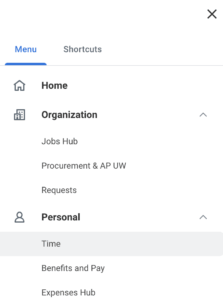
- Click on which week you want to add time to. This will take you to the schedule.
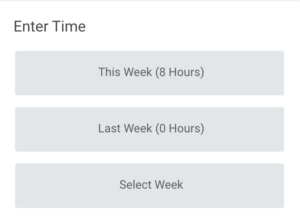
- Click anywhere on the schedule to create a new time submission
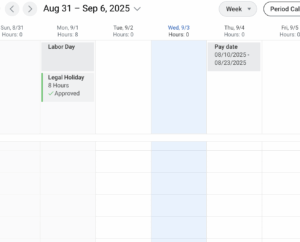
- In the Enter Time box, change the Time Type to Hours In/Out and add your time. Out Reason can be “Out”. If you have multiple campus jobs, make sure you select the correct Position. Click OK.
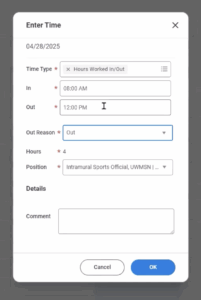
- To actually submit your hours into the system, click on the blue “Review” button and click “Submit”!
If you prefer a video demo, here is the one provided by Workday: Entering Time in Workday